 Andre Guelmann
See how to safeguard your future organic growth by investing just a few hours now.
Introduction
Founders usually don’t wake up excited about “doing marketing”. Many have been burned by fluffy campaigns and vague promises, so they postpone it as long as possible. Yet one channel quietly underpins most durable growth stories: organic search.
For early-stage startups, SEO is less about chasing vanity traffic and more about building a base layer of discoverability and trust:
-
People who already heard about you can actually find you.
-
People comparing you with competitors see your side of the story.
-
People searching for problems you solve land on your product, docs, or content - not on a random blog post or a rival.
Paid channels are great for speed, but they stop the moment you stop paying. SEO behaves more like product work: the work you ship today keeps paying off months and years from now as it compounds into more visibility, more branded searches, and more opportunities to be recommended by both humans and AI systems.
This guide is written for early-stage startups with:
-
Limited marketing resources.
-
A product that is still evolving.
-
A need to be disciplined about where every hour and dollar goes.
The goal is to show:
-
What minimum viable SEO looks like before you have a big content engine.
-
How to protect the basics: your brand, your comparisons, and your key use cases.
-
How to set yourself up for later, larger SEO bets and for an AI-driven search world, without pretending you can predict every change.
Why SEO matters even if you aren’t “doing marketing” yet
In the earliest stages, you probably don’t have a big marketing budget, a content team, or even clear messaging. That’s normal. Many founders treat SEO as something for “later, when we’re bigger”.
The problem: ignoring SEO entirely creates openings for other people to control the conversation about your product.
Three things tend to happen if you leave that space empty:
-
Competitors capture your branded demand
-
They bid on your brand terms in ads.
-
They publish “X vs [Your Brand]” pages from their point of view.
-
They fill “best [category] tools” lists where you’re missing or misrepresented.
-
-
High-intent search goes to third parties
-
Integration queries (“[your tool] + [popular tool]”) are answered by someone else.
-
People searching for “how to do [core job your product solves]” end up on generic tutorials that never mention you.
-
Review sites and aggregators become the main thing people see when they search your brand.
-
-
You pay for clicks you should own
-
Branded search traffic is “paid for” indirectly when competitors run branded ads.
-
If you don’t rank strongly for your own name and key use cases, you’re forced to rely on paid campaigns just to reach people already looking for you.
-
So the job of early-stage SEO is not to rank for “analytics” or “CRM” or “project management software”. At this stage, SEO is:
-
Primarily protective:
-
Comparisons between your product and competitors
-
Guides for integrating your product with other popular tools
-
Lists or reviews where your product appears credibly within your category
-
-
Deliberately small in scope:
-
A handful of well-structured, high-intent pages.
-
Clear, consistent messaging around what you do and who you’re for.
-
Basic technical hygiene so Google can crawl, index, and rank you.
-
Even modest early SEO work compounds. A few solid pieces of content and a clean site structure start building authority. That makes it easier for future pages to rank, helps branded searches click and stay on your site, and reduces how much you need to spend on protecting your own name later.
Read on to understand what you need to do or jump right to the checklist.
Protective SEO: control your brand, comparisons, and integrations
Before you chase broad category keywords, you need to control what people see when they look for you by name and when they compare you with alternatives. That is the job of protective SEO.
You’re not trying to rank for “analytics” or “CRM” yet. You’re trying to answer the most important evaluation questions with content you control.
1. Start with branded and high-intent searches
For most early-stage startups, the highest-value queries look like this:
-
Your brand name (with and without spaces)
-
Your product name(s)
-
Your domain (with and without .com, .io, etc.)
-
Your founder’s name
-
High-intent variants:
-
[brand] pricing
-
[brand] reviews
-
[brand] vs [competitor]
-
[brand] integration / [brand] + [other tool]
-
If you don’t show up clearly and convincingly for these, every other SEO effort leaks value.
Audit your “brand SERP”
Open an incognito window and search for:
-
[your brand]
-
[your brand] + software or [your brand] + product category
-
[your brand] reviews
-
[your brand] vs (see what autocomplete suggests)
-
[founder name] + company
Look across the full first page:
-
Which URLs from your own domain appear?
-
Which social profiles show up (LinkedIn, Twitter/X, GitHub, Product Hunt, etc.)?
-
Are there review sites, directories, or launch posts?
-
Are competitors bidding on your brand name?
This is your brand search shelf. Over time, you want that shelf filled with assets that represent you properly: your site, your docs, your social profiles, and a few trusted third-party sources.
Ship the non-negotiable pages on your site
Your own domain should fully answer what searchers expect when they type your brand or product name.
At minimum, you want:
-
Home page
-
One sentence that says what you do, for whom, and in which context.
-
A short list of key use cases or benefits.
-
-
Product / solution pages
-
One page per core use case or product line.
-
Clear problem → solution framing with simple screenshots.
-
-
Pricing page
- Even if prices are “talk to sales”, explain how pricing works, who pays for what, and what a “typical customer” looks like.
-
About page
- Company story, team, social proof (logos, testimonials), and links to press or launch posts.
-
Contact / Support / Docs
-
A clear way to contact you.
-
A help center or docs section that is indexable and answers common questions.
-
Make the naming boring and obvious:
-
Titles: include your brand + what the page is about (Pricing, About, Docs, etc.).
-
H1s: clear and descriptive, not just slogans.
-
Meta descriptions: short plain-language summaries of what users get on the page.
You’re not trying to be clever here. You’re trying to be unmissable.
Strengthen the rest of page one
Most brand searches show a mix like:
-
Your own site
-
Social profiles
-
Review platforms and directories
-
Launch posts (Product Hunt, Hacker News, blogs)
-
Random scraped or outdated content
You can nudge this mix over time:
-
Set up and complete key profiles
-
Company LinkedIn, GitHub org (for technical products), app store listing, Product Hunt, Crunchbase, etc.
-
Use the same brand name, logo, and short description everywhere.
-
-
Claim and improve review / directory listings
-
If your category lives on G2, Capterra, etc., make sure you have profiles there.
-
Fill them with accurate descriptions, categories, screenshots, and a link to your site.
-
Invite early customers to leave honest reviews.
-
-
Update or respond to misleading content
-
If you find outdated docs, launch posts, or comparisons that no longer reflect reality, update them where you can.
-
When you can’t edit the source, publish a better, up-to-date page on your own domain and link to it from relevant places.
-
Reduce brand hijacking
Competitors may bid on your brand even if you have strong organic results. You can’t fully stop that, but you can blunt the impact:
-
Give your organic result a clear title and description that match what brand searchers want.
-
Use internal links and navigation so search engines show sitelinks (pricing, docs, login, etc.).
-
If budget allows, run a simple branded search campaign so people see an ad that confirms they are in the right place.
When someone types your name, they should land on you, not on a competitor’s pitch or a random thread.
2. Comparison pages: “X vs Y vs You”
Once branded queries are covered, move to the moments where people weigh alternatives.
Create a small set of honest comparison pages, for example:
-
[Competitor] vs [Your Product]
-
[Competitor A] vs [Competitor B] vs [Your Product]
-
[Your Product] vs in-house / spreadsheets / generic tool
For each page:
-
Start with a clear use case: who is this for and what job are they trying to do.
-
List strengths and trade-offs for each option.
-
Show screenshots or simple flows of typical workflows.
-
Spell out who should not choose you (e.g. “If you need X at global scale, Y is a better fit.”).
That last part makes the page feel credible. If every section says “we are the best at everything”, people bounce, and the page stops working.
You don’t need to cover every competitor. Focus on:
-
The ones customers bring up in calls and tickets.
-
The ones that dominate review sites and “best tools” lists in your space.
3. Integration pages: “[Tool A] + [Tool B]”
Integration searches are one of the cleanest early SEO wins. People typing “[Tool A] + [Tool B]” or “[Tool A] integrate with [Tool B]” usually have a real project in front of them.
Cover these in two layers:
-
Single integration pages
-
“How to connect [Your Product] with [Popular Tool]”
-
Step-by-step setup with screenshots or short clips
-
Common troubleshooting tips and edge cases
-
-
Integration overview page
-
“Integrations” or “[Your Product] + other tools” page listing all supported connections
-
Short blurbs with links to the detailed guides
-
Good integration pages:
-
Use the exact wording people see inside both tools (menu labels, feature names).
-
Include at least one real use case or workflow, not just the API or button clicks.
-
Are linked from your docs and from the product UI where the integration lives.
Even a handful of these pages can bring in a steady flow of qualified visitors.
4. Category pages: “best tools for [job]”
There is no shortage of “best [category] tools” listicles, and many are thin or biased. You can still participate and add something more useful.
Pick angles that match your product’s strengths, for example:
-
“Tools for product analytics teams who care about event quality”
-
“Tools for support teams who want self-serve analytics”
-
“Tools for [niche audience] that need [specific constraint]”
On each category page:
-
Start with a short framework for choosing tools in this space.
-
List relevant tools, including competitors, with honest pros and cons.
-
Spell out that you build one of the tools on the list and what that means.
Your product should appear:
-
Where it genuinely fits well.
-
With clear reasons: better for small teams, better pricing at low volume, better compliance model, etc.
You are not pretending competitors don’t exist. You are helping visitors make a decision and showing where you are the right choice.
5. How much protective SEO is enough at this stage?
You can keep this layer tight:
-
Branded coverage
-
Core site pages (home, product, pricing, about, docs/support, contact).
-
A solid “brand shelf” with your main profiles and a couple of review/directory listings.
-
-
Evaluation content
-
3-5 comparison pages covering your most common matchups.
-
3-10 integration pages, depending on how many you support.
-
1-2 category pages that frame your space from your point of view.
-
This is not a huge content program. It is a controlled set of pages that:
-
Catch people close to a decision.
-
Give sales and support assets they can send in replies.
-
Create a base that can be recommended by other humans, cited by other sites, and picked up in search features and AI answers later.
Minimal technical SEO baseline
You don’t need a perfect Lighthouse score or a 50-page SEO audit to benefit from SEO at an early stage. What you need is a site that:
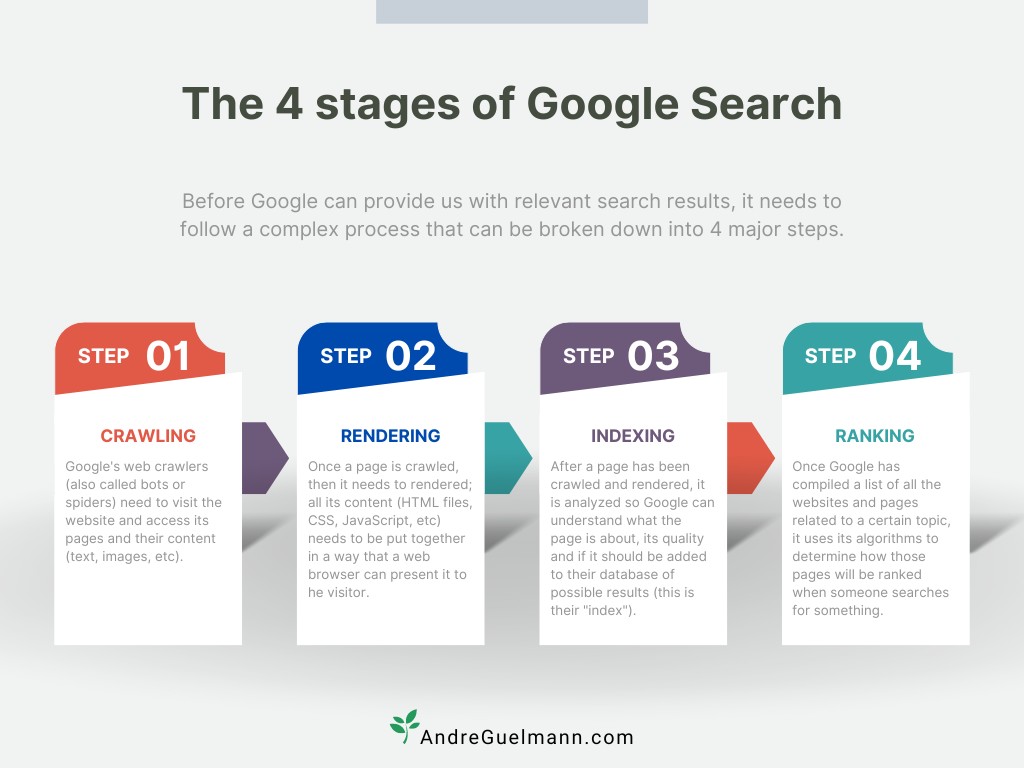
-
Can be found and crawled
-
Can be rendered
-
Can be indexed
-
Gives users a reasonable experience
Think of it as removing blockers, not chasing tiny technical gains.
1. Make crawling boring
You want search engines to move through your site without surprises.
Focus on:
-
Robots.txt kept simple
-
Don’t block your main pages, assets, or / by accident.
-
Only disallow obvious junk (staging environments, admin areas, tracking URLs).
-
-
Clean, stable URLs
-
Use readable slugs: /features, /pricing, /analytics-for-saas, not /page?id=123.
-
Avoid creating endless URL variations with filters, parameters, and tracking strings.
-
-
Logical internal links
-
Every important page should be reachable through links, not just through search or a direct URL.
-
Navigation and footer should link to your key pages (home, product, pricing, about, docs, blog).
-
From content, link to relevant product and docs pages using natural anchor text.
-
-
XML sitemap
-
Auto-generated and up to date.
-
Only includes URLs you actually want indexed.
-
If crawling is chaotic, nothing else matters. Start by making Googlebot’s job dull.
2. Make rendering straightforward
If your pages rely heavily on JavaScript, search engines may need to render them before they see meaningful content. That’s fine, but avoid hiding the basics behind complex setups.
Good practices:
-
HTML output should contain core content and links
-
At least page titles, headings, and main body text should be visible in the raw HTML, not loaded only after JS runs.
-
Navigation should be regular links, not fully JS-injected elements.
-
-
Avoid blocking resources
-
Don’t block important JS and CSS files in robots.txt.
-
If you use a framework (Next, Nuxt, Remix, etc.), stick with server-side rendering or hybrid rendering that outputs usable HTML.
-
-
Check what Google actually sees
- Use “View page source” (HTML) and “Inspect element” (final rendered page) to confirm that the important content is there in both.
The aim is that when a crawler fetches a URL, it doesn’t have to solve a puzzle just to understand what the page is about.
3. Check indexation and fix obvious problems
Indexing is simply: “is this URL in the search index and under which conditions?” You want your key pages indexed cleanly, without duplicates competing with each other.
Use Google Search Console to:
-
Submit your sitemap
- Confirm that new URLs are discovered quickly.
-
Check “Coverage” / “Pages” reports
-
Look for important pages stuck as “Crawled - currently not indexed”, “Alternate page with proper canonical tag” (when you didn’t expect that), or “Soft 404”.
-
Spot patterns where entire sections of the site are missing.
-
-
Reduce duplicates and noise
-
Avoid multiple URLs showing the same content (e.g. /pricing, /pricing/, /pricing?ref=abc).
-
Use canonical tags for necessary variations (e.g. sorting, filters).
-
NOINDEX pages that should never be landing pages (internal tools, test pages, certain thin thank-you pages).
-
At an early stage, you can set a simple rule: every page linked from your main navigation or footer should be indexed and in good shape unless there is a strong reason not to.
4. Performance and basic experience
You don’t need perfect Core Web Vitals, but you do need to avoid a site that feels broken or painfully slow.
Aim for:
-
Reasonable load times on mobile
-
Compress images and avoid loading huge media above the fold.
-
Use lazy-loading for heavy assets that appear later on the page.
-
-
No aggressive layout shifts
- Avoid elements that jump around as ads, fonts, or big images load.
-
Readable on small screens
-
Text large enough to read.
-
Buttons and links not crammed together.
-
No full-screen popups that block content on first visit.
-
Use tools (PageSpeed Insights, your framework’s dev tools) as warning systems, not as a score you must max out. Fix issues that clearly hurt users; ignore micro-optimisation that would eat days for tiny theoretical gains.
5. Site structure that matches how you talk about the product
Your information architecture is part technical, part marketing. It should:
-
Reflect your main product areas and use cases.
-
Group related content in a way that makes sense for both users and crawlers.
-
Make it easy to add new pages without restructuring everything.
A simple early-stage pattern:
-
/ - Home
-
/product or /features - overview
-
/solutions/[use-case] - one per core use case
-
/pricing
-
/about
-
/blog/[post] or /resources/[guide]
-
/docs/… - if you expose your docs
Then use internal links to connect:
-
From blog/guides → related product, solution, and docs pages
-
From solution pages → setup guides, integration docs, relevant blog posts
That structure helps search engines understand which pages are central and which are supporting, and it gives you a clean base for all the content you’ll add later.
Content that solves real problems
Once your basics and protective SEO are in place, the next layer is content that helps people do something concrete. At an early stage, this isn’t about “thought leadership” or broad topics. It’s about solving real problems your ideal users have, as directly as possible.
SEO for Early Stage Startups
1. Start from users, not from keywords
Before opening any SEO tool, look at what people already ask you:
-
Support tickets and chat logs
-
Sales and demo calls
-
Customer Slack/Discord channels
-
Community posts and GitHub issues
-
Founder inbox and personal DMs
Patterns you are looking for:
-
Repeated how do I… questions
-
Set-up and migration issues
-
Confusion around pricing, limits, or edge cases
-
Workarounds people share with each other
Each recurring question is a candidate for:
-
A tutorial or “how to” guide
-
A docs page or FAQ entry
-
A troubleshooting or “gotchas” article
You can always refine these with keyword tools later. The priority is: would this content help at least one real user tomorrow?
2. Favour low-volume, high-intent topics
Your original article already leans into low-volume searches as a good fit for startups.
The non-obvious piece pushes this further: ranking for 100 queries with 30 searches/month each can be far more valuable than fighting for one big generic keyword.
For each problem you identify:
-
Check if people search for it at all (even a handful of searches is fine).
-
Look at existing results: are they generic or actually helpful?
-
Decide if your product is a natural part of the solution.
Good early content opportunities often look like:
-
“How to [very specific task] in [tool]”
-
“[tool] + [tool] for [niche use case]”
-
“Debugging [very specific error or edge case]”
-
“Event tracking plan for [framework / language]”
These topics:
-
Are easier to rank for.
-
Attract people in the middle of real work.
-
Let you show your product solving a concrete problem without forcing it.
3. Three high-leverage content types
Your startup article already lists strong examples.
Combined with the non-obvious piece, a simple early stack looks like this:
a) Tutorials and step-by-step guides
-
“How to set up [job] with [tool/your product]”
-
“Event tracking guide for [framework]”
-
“How to migrate from [old way] to [new way]”
Guides should:
-
Show the full flow from blank state to working result.
-
Include screenshots or code snippets where relevant.
-
Mention alternatives, trade-offs, and common mistakes.
b) Docs and knowledge base articles
Docs aren’t just support material; they’re one of your most powerful acquisition channels.
Good SEO-friendly docs:
-
Have clear titles that match how users describe problems.
-
Use headings and short sections so both humans and machines can scan.
-
Include copy that states the problem and the outcome, not just UI labels.
-
Link to and from other relevant docs and product pages.
Any time you expand or improve your docs, you’re usually improving SEO as a side effect.
c) Integration and implementation guides
Some of this overlaps with protective SEO, but from a content perspective:
-
Think “How to actually get this working in a real stack”.
-
Include sample configurations, code, or workflows.
-
Answer the “what happens if…” questions that show up in support tickets.
A good pattern is:
“Integration overview page” → “Detailed guide per integration” → “Troubleshooting / FAQ for that integration”
Each piece can rank for its own cluster of long-tail queries.
4. Make content easy for machines and humans
Your non-obvious article explains that search engines reduce pages to signals and refine rankings by watching user behaviour.
For every piece of content, check:
-
Can a machine tell what this page is about?
-
Clear title with main concept and, if relevant, main tool/stack.
-
Descriptive H1 and subheadings.
-
Consistent terminology for the problem and solution.
-
-
Will a human stay after clicking?
-
First screen explains what they’ll get and for whom it’s written.
-
No aggressive popups or full-screen banners blocking the content.
-
Real examples, code, screenshots, or decisions - not just rephrased docs.
-
If people click, find what they need, and stick around, the page has a chance to climb over time.
5. Keep a small content backlog, not a huge calendar
At an early stage you don’t need a massive editorial roadmap. You need a small, constantly refreshed backlog tied to user reality.
A simple operating mode:
-
Keep a running list of problems and questions in a shared doc.
-
Score them roughly by:
-
Frequency in support/sales
-
Business relevance
-
Whether your product is part of the solution
-
-
Pick 1-3 to ship each week or sprint.
For each item, decide:
-
Is this best as a doc page, a tutorial, a comparison, or an integration guide?
-
Where will we link to it from (product UI, email, onboarding, other pages)?
Over time, this gives you:
-
A growing library of problem-focused content.
-
Better support and onboarding.
-
A search footprint that matches how your users actually think and talk.
Low-volume keywords and early SEO wins
Big, broad keywords are mostly a bad bet for early-stage startups. They are slow to move, crowded with incumbents, and often attract people who are still at a vague research stage.
The smaller, more specific queries are where you can win early.
1. What “low volume” really means
Keyword tools often show numbers that look tiny:
-
10-30 searches per month
-
0-10 searches per month (or even “no data”)
For most teams, these look uninteresting. For startups, they can be ideal:
-
People searching for them usually have a live problem.
-
They are far less competitive.
-
A single good guide can capture a large share of that small demand.
And you are not betting on just one. The goal is dozens of these small bets that add up.
2. Spotting good low-volume opportunities
Look for queries that combine:
-
A clear problem you already see in support/sales
-
A stack or context you care about
-
A place where your product is a natural part of the answer
Examples (you’d adapt to your product):
-
“Track feature flags in [analytics tool] without breaking funnels”
-
“Event tracking plan for [framework] + [analytics product]”
-
“Sync [tool] and [tool] users without manual CSVs”
-
“Monitor [specific metric] for [niche team]”
To vet a candidate:
-
Type the query (and close variants) into Google.
-
See if results are generic or actually helpful.
-
Check with a keyword tool:
-
If volume is non-zero or grouped in a small cluster, good.
-
If the tool says “no data” but you know from users that people phrase it this way, still consider it.
-
User truth beats tool estimates.
3. How to turn a low-volume topic into a strong page
For each chosen topic, write a page that:
-
States the problem in the first screen using the same wording users use.
-
Shows a concrete example: code, configuration, UI flow, or before/after.
-
Walks through the solution step by step.
-
Shows where your product fits, without pretending it is the only way.
You want readers to think:
“This person clearly understands my setup and showed me exactly what to do.”
Structure template:
-
Problem description
-
Prerequisites (tools, permissions, setup)
-
Step-by-step solution
-
Common mistakes / gotchas
-
Optional: how to extend or maintain this over time
4. Building a cluster instead of isolated posts
Single pages can rank, but clusters are more robust.
Once one guide starts getting traction (traffic, time on page, a few sign-ups), look around it:
-
Are there adjacent problems in the same stack?
-
Are there narrower versions (per framework, per role)?
-
Are there follow-up questions people ask after reading it?
Turn those into:
-
Additional guides
-
Docs pages
-
Troubleshooting / FAQ articles
Then:
-
Interlink them with each other.
-
Point them back to the most important product or solution pages.
Now you have:
-
A cluster that owns a slice of your niche
-
Multiple entry points into your product from search
-
Content that is also useful in docs, onboarding, and support
5. When to resist chasing bigger terms
You will be tempted to go after generic keywords:
-
“Product analytics tools”
-
“Customer data platform”
-
“Project management software”
For most early-stage startups, these should stay on the “later” list until:
-
You have clear product-market fit.
-
Your brand is searched regularly.
-
Your smaller clusters are already performing and you can see what works.
Until then, low-volume + clear pain is where your time pays off the fastest.
Showing up in LLMs, AI Overviews, and AI Mode
Search is no longer just “10 blue links”. Large language models, AI Overviews, and AI Mode now sit between users and websites, summarising information and linking to a handful of sources.
For a startup, the question is less “how do we game this?” and more “how do we make our pages safe, clear choices for an AI system to quote?”
1. What these features actually do
-
AI OverviewsGoogle shows an AI-generated summary at the top of some results, with a short answer and a small set of source links (usually three to five).
-
AI ModeA conversational layer inside Search that lets people ask follow-up questions, refine queries, and get longer AI answers with supporting links. Google positions it as “our most powerful AI search”, designed for complex questions and comparisons.
-
**LLMs more broadly (ChatGPT, Perplexity, Gemini, etc.)**These systems answer based on:
-
Their training data (a frozen snapshot of the web and other sources).
-
Retrieval of fresh pages or documents at query time, a pattern often called retrieval-augmented generation (RAG).
-
Current research suggests:
-
AI Overviews now appear on a large share of searches in the US (multiple studies report anywhere from ~18-60% depending on sample and timeframe).
-
Click-through on classic organic results drops when an AI Overview is present, but those source citations are highly visible.
-
Sources in AI Overviews often overlap with top organic results, but not always: roughly half of citations can come from pages that are not in the top organic slots.
So you still need “normal” SEO, but you also want your pages to be easy for LLMs to parse, trust, and quote.
2. How AI Overviews and LLMs pick sources
Public statements and independent reverse-engineering line up on a few key points:
-
They start from regular search results and other known sources.
-
They pick pages that:
-
Match the topic and intent very closely.
-
Have clear entity signals (who/what the page is about).
-
Are easy to parse (structured headings, lists, direct answers).
-
Look trustworthy (authoritative domains, consistent information, good track record).
-
-
In many cases they “fan out” into related queries to cover subtopics, pulling in more sources for nuance.
There is no special “AI Overview schema”. Google’s own docs stress that AI features rely on the same basic principles as normal Search: content quality, relevance, and the usual technical requirements.
So the way to “rank” in AI surfaces is to:
-
Be a good organic result.
-
Make answers trivial for a model to lift and reuse.
-
Make your brand and product unambiguous as entities.
3. What this means for an early-stage startup
Your existing work in this article already points in the right direction:
-
Protective SEO gives you pages about your brand, product, comparisons, and integrations - all with clear entity signals.
-
Problem-solving content (tutorials, docs, integration guides) is exactly the material AI systems look for when users ask “how do I…?” questions.
The AI layer changes emphasis:
-
Less value in generic “best X tools” listicles that just rehash other content (AI Overviews are already doing that summarising).
-
More value in:
-
Detailed, accurate walkthroughs.
-
Honest comparisons and trade-offs.
-
Niche, high-intent topics where you have real expertise.
-
4. Make your site “LLM-ready”
Here is a practical checklist you can apply to your key pages.
a) Entity clarity
Make it obvious who and what your pages talk about:
-
Use your brand and product names in titles, intros, and alt text, instead of only slogans.
-
Have a clear About page that states:
-
Company name and domain
-
What you do
-
Key people, locations, and markets
-
-
Keep names consistent across your site and major profiles (LinkedIn, GitHub, app stores, review platforms).
This helps both search engines and LLMs resolve “[Your Product]” as a specific thing rather than a generic phrase.
b) Answer structure
For problem-solving pages (tutorials, docs, integrations):
-
Lead with a short, direct summary of the solution in the first 2-3 sentences.
-
Use headings that mirror real questions:
-
“How it works”
-
“Step-by-step”
-
“Common problems”
-
-
Use lists, tables, and code blocks for key details, not buried prose.
This makes it easy for an LLM to grab the right span of text as a quote.
c) Evidence and specificity
Thin, generic content is bad for classic SEO and even worse for AI selection.
Strengthen your pages with:
-
Concrete numbers, examples, or case snippets where you can.
-
Screenshots or diagrams with descriptive captions.
-
Clear statements of limitations: where your approach does not apply.
The more “grounded” a page is in real details, the safer it is for an AI system to use.
d) Presence on trusted hubs
LLMs and AI search features draw heavily from:
-
Docs and knowledge bases
-
GitHub and package registries (if you are a dev tool)
-
Major review / comparison sites in your niche
-
Reputable blogs and communities
For an early-stage startup:
-
Make your docs public by default, and indexable.
-
If you’re a developer tool, publish readable README files, quickstarts, and examples on GitHub.
-
Claim your presence on 1-2 relevant review platforms and keep them up to date.
You don’t need to be everywhere; you just want a few strong, consistent signals.
e) Clean technical base
Everything from the technical baseline section still applies here:
-
Pages must be crawlable and indexable.
-
HTML should expose core content, not hide it behind heavy JS.
-
Performance should be good enough that users don’t bounce immediately.
If models can’t reliably fetch or render your page, it can’t be a source.
5. What you can and can’t measure right now
Measurement for AI surfaces is still rough:
-
Google Search Console currently does not show impressions or clicks for AI Overview citations, even when your page is used as a source.
-
You also don’t get any direct stats when LLMs such as ChatGPT or Gemini read your pages as context via RAG.
Practical steps:
-
Watch for brand search and direct traffic rising over time as a proxy for exposure.
-
Track organic conversions on pages that are good candidates for AI citations (how-to guides, docs, comparisons).
-
Use manual checks:
-
Search common questions in your space and see which pages show up in AI Overviews and AI Mode results.
-
Test complex, multi-step queries where you think your product should be relevant.
-
You will not get perfect attribution here. The goal is to align your site with how AI systems already work, not to build a separate “AI SEO” program.
When to double down on SEO
Everything so far is about a small, sharp SEO footprint: protect your brand, cover comparisons and integrations, fix the basics, and publish problem-solving content around low-volume pain points.
At some point, though, the constraint stops being “we don’t know who we’re for” and becomes “we need more of those people”. That’s where a bigger SEO program starts to make sense.
1. Signs you’re ready to scale SEO
You don’t need a perfect PMF survey score. You do need enough signal that more traffic of the right type will actually turn into revenue.
Look for a mix of:
Product and usage signals
-
New users keep coming back without being chased.
-
You see clear “core actions” people repeat (dashboards viewed, projects created, events tracked, etc.).
-
Churn is no longer wild and you have some idea why people leave.
Demand signals
-
Branded search grows steadily (check Search Console).
-
Prospects already arrive knowing your name from somewhere.
-
Word of mouth, communities, or partners mention you without prompting.
Sales / funnel signals
-
You can describe your ideal customer in a few sentences.
-
Sales or founder calls have predictable objections and patterns.
-
You can identify which use cases are easiest to close and retain.
If you still don’t know who your best customers are or why some stick and others don’t, pouring fuel on the top of the funnel just magnifies the confusion.
2. What changes once you commit to SEO as a growth channel
Early SEO is about plugging leaks and picking up obvious wins. After PMF, you can widen the scope.
A few things usually change:
From “a few key pages” to “structured topic areas”
-
Instead of scattered guides, you build topic clusters:
-
One strong hub page on a core theme
-
Multiple supporting pieces (guides, docs, comparisons, FAQs) all linked together
-
-
You map those clusters directly to the main jobs your product solves.
From only bottom-of-funnel to full funnel
You add content that speaks to:
-
People who know the problem but not the solution type (how to reduce churn in B2B SaaS).
-
People who know the solution type but not you (product analytics tools for early-stage startups).
-
People in “upgrade mode” (replace spreadsheets for [workflow]).
You still keep a bias toward practical, product-adjacent topics. The difference is reach and surface area, not a new personality.
From “publishing when we can” to a content engine
-
A repeatable process for:
-
Research → outlines → drafts → review → publish
-
Updating and consolidating older pieces
-
-
Clear roles:
-
Who owns briefs and keyword research
-
Who writes
-
Who checks technical accuracy
-
Who ships and measures
-
This doesn’t have to mean a huge team; it does mean someone actually owns SEO/content as part of their job.
3. Expanding your SEO bets
Once the basics and early wins are in place, you can afford to place some larger bets.
Common moves:
a) Go after a few bigger, competitive terms
Pick a short list of “category” searches that match your sweet spot, for example:
-
“[product category] for [segment]”
-
“[product category] with [specific constraint]”
-
“[product category] for [role]”
Then:
-
Build a genuinely strong hub page for each.
-
Support them with detailed guides, docs, and case studies that back up the claim.
-
Invest time in internal linking so these hubs sit at the centre of relevant content.
b) Build more opinionated “how we think” pieces
These should still be grounded in your product reality, not pure brand essays:
-
“Our framework for [job] in [type of company]”
-
“What goes wrong in [process] and how to fix it”
-
“How we instrument [thing] inside our own stack”
They give people a reason to trust you beyond a feature list, and they give LLMs and AI search something distinctive to quote.
c) Invest in links and relationships
You don’t need a classic “link building campaign”, but at scale you can’t ignore links:
-
Publish material that others want to reference: benchmarks, templates, detailed breakdowns.
-
Share and repurpose this in the channels where your audience already hangs out (Slack communities, GitHub, newsletters, conferences).
-
Contribute guest content or talks where it makes sense, pointing back to your best evergreen pieces.
4. Team and ownership
Past a certain point, “everyone kind of helping with content” stops working.
Options that usually work better:
-
A dedicated owner inside the company (product-minded marketer, technical writer, or SEO lead) who:
-
Maintains the roadmap of topics and pages
-
Coordinates with product, sales, and support
-
Reviews performance and suggests course corrections
-
-
Or a tight partnership with a consultant/agency, where:
-
Strategy and priorities are aligned with your PMF learnings
-
You keep internal subject-matter experts involved in review
-
Execution (research, writing, some ops) can be offloaded
-
What you want to avoid is a big outsourced content program that runs ahead of your product and fills the site with generic copy that no customer or LLM finds useful.
5. What stays the same
Even as you scale, the foundations from the early stages do not change:
-
Brand and comparisons still need clear, honest pages.
-
Docs and integration guides remain high-value content.
-
Low-volume, high-intent topics continue to convert better than broad curiosity searches.
-
AI Overviews and LLMs still favour pages that are accurate, structured, and specific.
Scaling SEO after PMF is not a different discipline. It’s the same principles applied with more focus, more content, and a more deliberate process.
Treat SEO as a habit
If you treat SEO as a one-off project, it drifts out of date fast. For an early-stage startup, a light but steady rhythm works better than a big push every six months.
You don’t need a complex dashboard or a dozen tools. You need a small stack and a simple loop.
1. A small, boring toolset
This is usually enough:
One main SEO suite
-
Ahrefs, Semrush, Moz, Serpstat, Similarweb, etc.
-
Use it to:
-
Check SERPs when planning content
-
See basic keyword data
-
Run occasional site audits for obvious issues
-
Glance at backlinks for you and key competitors
-
Google Search Console
-
Check that key pages are indexed
-
See which queries bring traffic to which pages
-
Spot new long-tail terms you should own
-
Notice sudden drops by page or by query
Analytics / product analytics
-
GA, Plausible, PostHog, Mixpanel, or similar
-
See how organic visitors behave:
-
Do they sign up, request demos, or hit key product milestones?
-
Which pages bring useful traffic vs passive readers?
-
You can add a lightweight browser extension for quick volume checks, but treat it as a helper, not your strategy.
2. A weekly loop
Once a week (or every sprint), spend an hour answering three questions:
-
What did we ship that touches SEO?
-
New pages: guides, docs, integration pages, comparisons
-
Product changes that might affect URLs, navigation, or copy
-
-
What are people actually reading and doing?
-
Top organic landing pages for the last 7 days
-
Any new queries showing up in Search Console that match your product well
-
Behaviour on key pages (bounce, time on page, sign-ups)
-
-
What tiny fix or addition can we ship next?
-
Improve one protective page (comparison, integration, category)
-
Turn a recurring support question into a short doc or guide
-
Update an older article that still gets traffic but feels outdated
-
Write down 1-3 concrete actions, tie them to owners, and move on.
3. A monthly review
Once a month, zoom out a bit:
a) Brand and protective layer
-
Do we fully own page one for our brand name?
-
Are comparison and integration pages getting visits and conversions?
-
Are there new competitors, review pages, or directory listings we should react to?
b) Content that solves problems
-
Which guides or docs brought in:
-
The most organic sign-ups or demos
-
The most “engaged” sessions (scroll, return visits, feature use)
-
-
Are there obvious gaps in the journey:
-
Common questions support keeps answering manually
-
Steps people fail on during setup or integration
-
c) Direction of change
-
Branded impressions and clicks in Search Console
-
Number of queries where you appear in the top 10
-
Any big drops tied to deployments, migrations, or redesigns
This gives you a rough sense of whether your small SEO footprint is compounding or stalling.
4. A simple operating checklist
You can keep a short recurring checklist like this:
-
New important page?
- Is it crawlable, indexable, and linked from somewhere sensible? -
New feature, integration, or use case?
- Do we have at least one page that explains it in user language? -
New common question in support/sales?
- Did we turn it into a doc, FAQ, or guide? -
Top pages from last month?
- Did we refresh or improve at least one of them? -
Any structural changes to the site?
- Did we check for broken links, redirects, and index issues?
Run this kind of loop and you avoid the two extremes: neglecting SEO for months, or trying to “fix everything” in one massive project.
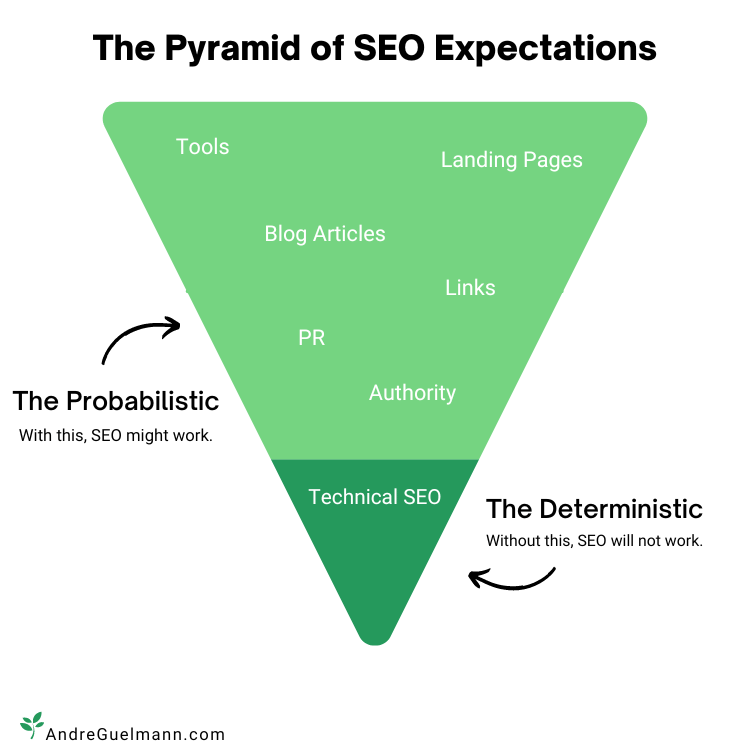
SEO checklist for early-stage startups
Use this as a quick health check or a quarterly review. You don’t need every box perfect, but big gaps here usually explain why SEO isn’t working.
| Area | What to check | Actions if missing / weak |
|---|---|---|
| Protective SEO - brand searches | Google your brand, product, domain, and founder name (incognito). Look at the full first page. | Create or improve: home, product/solutions, pricing, about, docs/support, contact. Make titles and H1s clear and branded. Claim and complete key profiles (LinkedIn, GitHub, Product Hunt, review sites). |
| Protective SEO - comparisons & category | Search [brand] vs, [competitor] vs [you], “best [your category] tools”. | Write honest comparison pages for top competitor matchups. Add 1-2 category pages that frame your space from your point of view. Link them from your main nav or a “Resources” section. |
| Protective SEO - integrations | Search [your product] + [popular tool], and the reverse. Check if you show up at all. | Ship an “Integrations” overview page and detailed guides for your top integrations. Include real workflows and troubleshooting tips. Link from product UI and docs. |
| Crawling & index | In Search Console, check that your main pages are indexed. Look for unexpected “Crawled - not indexed” or soft 404s. | Fix broken internal links. Submit a clean XML sitemap. Remove junk URLs and add noindex where appropriate. Make sure every important page is linked from somewhere obvious. |
| Rendering & basic performance | Load key pages on a slow mobile connection. Run a quick PageSpeed check for one or two URLs. | Fix anything that makes pages feel broken or painfully slow: giant images, blocking JS, layout shifts. Don’t chase perfect scores; focus on obvious user pain. |
| Site structure & internal links | Look at your navigation, footer, and a few content pages. Is it clear how to move between related topics? | Use a simple structure (/product, /solutions/[use-case], /pricing, /docs, /blog). From guides and docs, add links to relevant product/solution pages and other helpful articles. |
| Problem-solving content | List your top 10 support/sales questions. Check if each has a URL you’d be happy to send. | Turn recurring questions into docs, tutorials, or FAQs. Give each page a clear “who this is for” and “what you’ll get” in the intro. Update old pieces that still get traffic. |
| Low-volume, high-intent topics | In Search Console and your SEO tool, look for long-tail queries that already bring some traffic. | For each promising cluster, create or improve one strong guide with a full walkthrough. Once one works, add adjacent guides and interlink them as a small cluster. |
| Docs & integrations as acquisition | Check if your docs and integration guides are public, indexable, and readable outside the product. | Open up docs where possible. Add intros that describe the problem and outcome, not just UI labels. Make sure docs link back to product and solution pages where it makes sense. |
| Entity clarity for LLMs & AI search | Look at your About page and key product pages. Would an outsider know exactly who you are and what you do? Run a free scan with BeSeenByAI to see it from the crawler’s side. | State company and product names plainly. Keep names and descriptions consistent across site and major profiles. Use clear headings and short summaries that an AI can safely quote. |
| SEO tools in place | Confirm you actually use: one SEO suite, Search Console, and analytics/product analytics. | Set up or fix access. Create 2-3 saved views or simple reports: top organic landing pages, organic conversions, and new queries. Avoid adding new tools unless they replace something. |
| Weekly habit | Ask “What did we ship that touches SEO last week?” and “What did people read and do?” | Pick 1-3 small actions: improve one protective page, turn a new question into a guide, refresh a top landing page. Assign an owner and ship in the next sprint. |
| Monthly review | Once a month, review branded coverage, top organic pages, and any big traffic changes. | If brand coverage is weak → more protective SEO. If a page brings good traffic but poor conversion → improve copy and next steps. If a cluster works → expand it. Document decisions so you don’t repeat work. |
You can adapt this table to your own stack and stage, but if most rows are green, your SEO foundation is in a good place for an early-stage startup.