Summarize with:
Most “technical SEO checklists” are long, tactical, and low-signal. This one is short and sequenced around how Google actually works:
Discovery → Crawling → Rendering → Indexing → Ranking (we’ll go over these stages later, don’t worry). If a task doesn’t help one of these stages, it’s usually not worth your time right now.
You’ll use this in two ways:
- First to do: run the technical checks to unblock visibility so Google can find, fetch, see, and store your key pages.
- First to let go: once those stages are healthy, stop chasing technical busywork and shift the bulk of effort to relevance, usefulness, and growth. Google’s own docs back this order: there’s no single “page experience” ranking system; Core Web Vitals help but don’t guarantee rankings.
Who this is for: founders, CMOs, and non-SEO leaders who need a clear, defensible “what matters now vs. later” list they can run with their team or vendor.
Read on to understand what you need to do or jump straight to the checklist.
If you instead is interested in Technical GEO and AI Readiness, check out my new tool.
Section 1 — How Google Search Works.
The stages of Google Search, in order, are: Discover → Crawl → Render → Index → Rank
In order for any page of your website to appear on Google, it needs to pass by each of the stages in this order – so if there’s a problem at any of these stages, this process stops and you won’t appear on google, period.
Google can only rank what it can find, fetch, see, and store, in this order. Work that doesn’t help one of these stages is rarely worth your time right now.
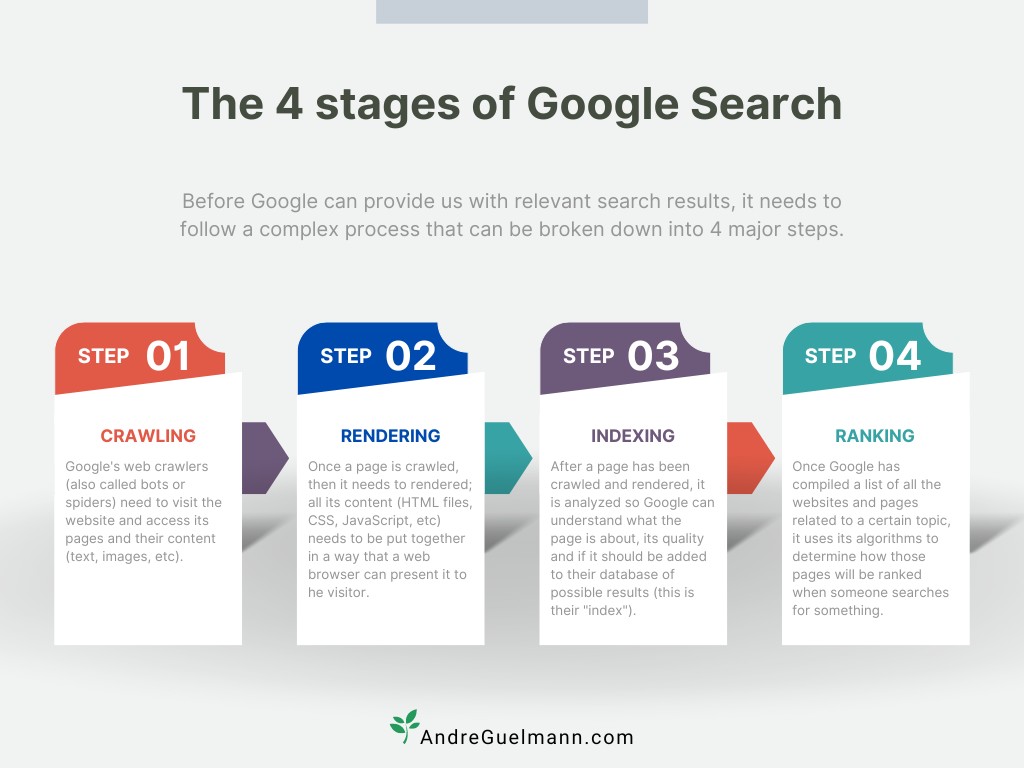
A. Discovery — can Google find your important pages?
Google learns URLs from links and sitemaps, then schedules them for crawl. If a key page isn’t discoverable, nothing else happens. Keep internal links to your money pages obvious, and maintain a concise, up-to-date XML sitemap.
B. Crawling — can Google fetch what it found?
Googlebot fetches known URLs, subject to your rules and server capacity. Don’t block important paths in robots.txt, and avoid creating oceans of near-duplicate parameter URLs that waste crawl on the wrong stuff.
C. Rendering — can Google see what users see?
Modern sites often rely on JavaScript. Google processes JS in phases: crawl → render → index. If critical content or links only appear after heavy client-side code, Google may not “see” them in time or at all. Expose core content in the HTML or use rendering approaches that surface it reliably.
D. Indexing — will Google store the right version?
Once Google can read a page, it may add it to the index. Duplicates, conflicting canonicals, or soft-404 patterns can prevent storage or choose the wrong URL. Aim for one canonical URL per piece of content, correct status codes, and sitemaps that list canonical URLs.
E. Ranking — do you deserve to show up for the query?
From what’s indexed, Google’s ranking systems evaluate meaning, relevance, quality, context, and page experience signals. There is no single “page experience” ranking system; Core Web Vitals help users and can assist ranking, but relevance and usefulness lead.
Before any of this matters, your site has to be eligible for Search. Google’s Search Essentials and spam policies apply across the board; serious violations can suppress or remove pages entirely. Think of this as the gate before discover → crawl → render → index.
Founder takeaway: sequence your effort in this order. Fix proven blockers in A–D first; then compete on E with relevance and useful content. If a “technical” task doesn’t measurably improve one of these stages, park it for later.
2) Discovery — can Google find your important pages?
Goal: make your revenue pages easy for Google to find. If discovery is weak, nothing else (crawl, render, index, rank) happens.
Quick founder checks
- Are your top pages linked from other pages? Internal links are how Google finds new URLs. If a page has no links pointing to it, it’s “orphaned.”
- Do you have a clean XML sitemap listing your key URLs? A sitemap is a strong hint that helps Google discover important pages, especially on larger/complex sites. It doesn’t guarantee indexing, but it improves coverage.
- Did you submit that sitemap in Search Console? You’ll see fetch status and parsing errors in the Sitemaps report.
- Are you following Google’s baseline “Search Essentials”? These are the minimums for being eligible to appear at all.
Fixes that move the needle
- Curate internal links to money pages (Pricing, Product Detail Page, key categories). Use descriptive anchor text so people and Google understand the destination.
- Keep a focused, up-to-date XML sitemap (canonical URLs only; remove 404s/redirects). Submit it and monitor it in Search Console.
- Make navigation simple so core pages are a few clicks from the homepage; proper linking often makes a sitemap optional for small sites, but most sites still benefit from having one.
What to ignore for now
- Sitemap busywork (tweaking priority/changefreq fields or chasing minor warnings) when your key URLs are already being discovered and crawled. Google treats sitemaps as hints.
- Non-critical pages in the sitemap (filters, thin variants). Keep it to pages you actually want found and indexed.
“Proof you’re done” (simple evidence)
- In Search Console → Page indexing, your important URLs show up as discovered/indexed; the Sitemaps report shows Google fetching your file without errors.
- In Search Essentials, you meet the technical basics so Google can reach and consider your content.
3) Crawling — can Google fetch what it found?
Goal: make sure Googlebot can reach important URLs reliably, without wasting time on junk. If crawling stalls, rendering/indexing can’t happen.
Quick founder checks
- robots.txt isn’t blocking money paths. robots.txt controls what crawlers may fetch; use it to shape crawl, not to hide pages you want in Search.
- Server is healthy. Lots of 5xx errors or timeouts slow Googlebot; fast, available servers get crawled more. Check the Crawl Stats report.
- Parameters/filters aren’t exploding URLs. Faceted filters can create near-infinite URLs that soak up crawl budget.
Fixes that move the needle
- Keep robots.txt simple and surgical. Don’t block key sections; when you do disallow, be explicit and use Allow to open needed paths in otherwise disallowed areas.
- Triage faceted/parameter URLs. Either:
- Watch Crawl Stats and error rates. Use Search Console’s Crawl Stats report to spot spikes in errors, slow response, or unexpected URL patterns.
What to ignore for now
- “Crawl budget optimization” on small/medium sites that are already crawled promptly. Google’s guidance focuses crawl-budget work on large/fast-changing sites.
- Robots.txt tricks to de-index pages. robots.txt is about crawling, not removal; if you need something out of Search, use proper noindex/removal methods rather than blocking crawl.
“Proof you’re done” (simple evidence)
- In Search Console → Settings → Crawl stats, important sections show steady requests, low error rates, and reasonable response times.
- Crawl isn’t being soaked up by endless filter/parameter variants; your faceted URLs follow Google’s best-practice patterns when you do allow them.
Robots.txt vs. noindex — common mistakes (read this before you block anything)
- Using robots.txt to “remove” pages from Google.
robots.txt controls crawling, not indexing. A disallowed URL can still be indexed from links (URL + anchor text can appear in results). If you want a page not to appear in Search, use noindex or require authentication (put it behind a login). - Putting noindex on a page that’s also Disallowed.
Google can’t see a meta noindex if crawling is blocked. Don’t combine them. If removal is the goal, allow crawl long enough for Google to fetch the noindex, or return a 404/410. - Blocking CSS/JS needed to render content.
Google’s pipeline is crawl → render → index. If you block critical resources, Google may not “see” your content like users do. Allow essential CSS/JS; only block truly non-critical assets. - Trying to use robots.txt for fast takedowns.
For quick, temporary removals from results, use the Removals tool in Search Console; then fix the source (add noindex, 404/410, or protect the page). - For non-HTML (PDFs, etc.).
Use the X-Robots-Tag: noindex HTTP header if you can’t edit HTML. Same effect as meta noindex.
Founder rule of thumb:
- robots.txt = “don’t fetch this” (crawling control)
- noindex = “don’t show this” (indexing control)
If you need it gone from results, start with noindex (or 404/410), not Disallow.
4) Rendering — can Google see what users see?
Goal: make your primary content and links visible to Google’s rendering pipeline. Google processes modern sites in phases: crawl → render → index. If key content only appears after heavy client-side code or blocked resources, Google may not see it in time—or at all.
Quick founder checks
- Is the core content in the HTML that Google gets? If not, confirm it appears after rendering and that Google can render it. Use URL Inspection → Test live URL → View tested page to see the rendered HTML/screenshot.
- Are CSS/JS blocked in robots.txt? Don’t block essential resources—Google needs them to render like a browser.
Fixes that move the needle
- Expose critical content and links in HTML (or reliably server-render/hydrate them). For JS-heavy apps, Google’s own JavaScript SEO basics explain the queue from crawl to render to index; design so important text/links are available to that renderer.
- Unblock required CSS/JS. If robots.txt hides your assets, Google can’t render the page correctly; allow access to essential resources.
- Avoid dynamic rendering as a strategy. Google classifies it as a deprecated workaround; prefer architectures that render consistently for users and crawlers.
What to ignore for now
- Cosmetic DOM tweaks that don’t change whether primary content/links are visible to the renderer.
- Exotic render workarounds when a simpler fix (e.g., shipping key text in HTML) solves the problem. Keep it boring and reliable.
“Proof you’re done” (simple evidence)
- In URL Inspection, the rendered HTML contains your headline, body copy, and critical links; the screenshot looks like a real user view.
- No essential CSS/JS are disallowed; your robots.txt is for crawl shaping, not hiding render-critical files.
5) Indexing — will Google store the right versions?
Goal: get the right URLs stored in Google’s index (one representative URL per piece of content), and keep the wrong ones out. Canonicalization and exclusion rules live here. If indexing is messy, rankings will be messy too.
Quick founder checks
- One URL per page of content. If multiple URLs show the same thing (parameters, case/trailling slashes, print views), pick a canonical and signal it consistently.
- No fake “not found.” Pages that say “not found” but return 200 OK are soft-404s; they waste crawl/index capacity. Return real 404/410 for gone content.
- Sitemaps list canonicals, not variants. Don’t feed Google duplicates in your sitemap; it’s a hint for preferred URLs.
- Page Indexing report is clean. Use Search Console → Pages to confirm important URLs are Indexed and understand why others aren’t.
Robots.txt vs. noindex (read this before you block anything)
- robots.txt controls crawling, not indexing. A Disallow URL can still appear in results via links/anchor text. If you need a page out of Google, use noindex (or return 404/410), not robots.txt.
- Don’t combine Disallow + noindex. Google can’t see meta/HTTP noindex on a URL it’s blocked from crawling, so the rule won’t be read. Unblock, let Google fetch the noindex, then you can disallow if you still need to. For non-HTML (PDF, etc.), use X-Robots-Tag: noindex.
Fixes that move the needle
- Canonicalize duplicates. Use <link rel=”canonical” href=”…”>, matching canonicals in sitemaps, and consistent internal links to the canonical. Works for HTML; you can also send a rel=canonical HTTP header for non-HTML.
- Return correct status codes. Use 301 for permanent moves, 404/410 for gone pages; avoid soft-404 templates. Validate after launches/migrations.
- Tame parameters/faceted URLs. If variants shouldn’t be indexed, keep them out of sitemaps, avoid linking to infinite combinations, and consolidate to clean canonical URLs. (Crawl controls belong in the Crawling section; indexing signals live here.)
- Use the Page Indexing report to verify outcomes. It explains “Why pages aren’t indexed” and highlights soft-404s, duplicates, and canonical mismatches.
What to ignore for now
- Over-engineering canonicals when you don’t actually have duplication. Keep it simple and consistent.
- Trying to de-index via robots.txt. That’s crawl control, not removal. Use noindex or proper 404/410, or the temporary Removals tool if you need a short-term hide.
“Proof you’re done” (simple evidence)
- In Search Console → Pages, your key URLs are Indexed, duplicates point to the same canonical, and soft-404s are gone.
- Spot-checks of duplicate variants (with parameters/trailing slashes) show Google displaying the preferred canonical in results. Canonical hints are consistent across HTML, headers (if used), and sitemaps.
6) Ranking — now that you’re visible, do you deserve to rank?
Goal: win the query by matching intent better than competitors, with content people find helpful and trustworthy. Technical polish helps, but it won’t carry weak relevance.
What Google actually optimizes for
- Google’s ranking systems use many signals at the page level (with some site-wide signals), and there is no single “page experience ranking system.” Core Web Vitals help users and can assist ranking, but relevance and usefulness lead.
- In March 2024, Google refined core systems to better down-rank unhelpful or search-engine-first content, and it folded “helpful content” into core ranking systems. Expect stronger headwinds for thin/SEO-only pages.
- Spam policies (e.g., site reputation abuse) can suppress or remove results when third-party or misaligned content tries to ride a site’s authority.
Quick founder checks
- Intent fit: For your money queries, does the page actually solve the task better than the alternatives? (Comparison detail, pricing clarity, proof, next step.)
- Experience fit: Useful structure + clear navigation + fast, responsive interaction. Treat Core Web Vitals as an assist, not the headline KPI.
- Policy fit: Are you aligned with Search Essentials and spam policies? If not, rankings won’t stick.
Fixes that move the needle
- Close the intent gap on key templates (Pricing, Product Detail Page, category/solution/comparison pages): add the specifics buyers expect (benefits, differentiators, FAQs, proof, CTAs). Map sections to actual queries and tasks.
- Pair UX/performance work with the journey you’re monetizing: e.g., target INP and LCP on Pricing and Product Detail Pages, then measure form completion or add-to-cart/checkout on those templates. (INP replaced FID on Mar 12, 2024.)
- Clean up risky content patterns: remove or quarantine third-party content that doesn’t align with your site’s purpose; avoid “parasite” arrangements that trip site-reputation-abuse rules.
What to ignore for now
- Chasing perfect lab scores when intent coverage is thin. Page-experience signals can help in close, competitive races; they won’t lift irrelevant pages.
- Vanity pages for every keyword variant that don’t add unique value. The March 2024 changes specifically look for unhelpful, query-shaped content.
“Proof you’re done” (simple evidence)
- Non-brand impressions and clicks rise on mapped queries for your money pages (Search Console).
- Template-level conversion improves where you targeted UX/performance (Pricing form completion, Product Detail Page add-to-cart, checkout finish), alongside healthier CWV in field data.
7) High-risk moments that justify a short “tech-first” sprint
These are the few times where technical work should jump to the front of the queue because it directly affects discover → crawl → render → index at scale.
A) Site moves or migrations with URL changes (domains, paths, HTTP→HTTPS)
Traffic can drop fast if this is mishandled. Use permanent, one-to-one redirects; update canonicals, internal links, and sitemaps; validate after launch; and register the move in Search Console’s Change of Address (for domain changes).
B) Site moves without URL changes (hosting/CDN swaps)
Keep URLs the same, but plan like a launch: prep new infrastructure, flip DNS, monitor both old and new stacks for availability/latency, and watch crawl stats.
C) Faceted navigation & parameter explosions
Filters can generate millions of near-duplicate URLs that soak up crawl and confuse indexing. Decide your stance:
- If filtered URLs should not be indexed, prevent crawling of those patterns in robots.txt.
- If some should be indexed, follow Google’s faceted-URL best practices (clean parameter keys/values, stable ordering, only expose useful combinations).
D) Status codes, redirects, and “soft-404s”
Google uses status codes to understand what to index. Don’t serve “not found” pages with 200 OK (that’s a soft-404). Return real 404/410 for gone content; use 301 for permanent moves; avoid chains and mixed signals.
E) Robots.txt and removal choices (fast decisions during change)
Remember the split: robots.txt controls crawling, not indexing. To remove a URL from results, use noindex (or 404/410), and only block crawling when you’re sure you don’t need Google to fetch the rule. For emergency hides, use the Removals tool in Search Console, then fix at the source.
F) Rebrands & redesigns (with and without URL changes)
Why it’s high-risk: big visual/IA changes can break discover → crawl → render → index even if URLs don’t change; domain/name changes add migration risk.
If URLs change (new domain/paths):
- Map one-to-one 301 redirects for every moved URL; update canonicals, internal links, and XML sitemaps to the new canonical URLs; then use Change of Address in Search Console for domain moves. Monitor after launch.
If URLs stay the same (visual/IA refresh):
- Keep a crawlable URL structure; don’t regress into parameter chaos.
- Validate rendering: ensure primary content/links are still visible to Google (don’t hide core text behind new client-only JS).
- Preserve critical SEO signals where they still make sense (internal links, titles/meta, structured data), then re-measure. (Signals aren’t all-or-nothing; prioritize what helps users & relevance.)
Staging & launch hygiene (where mistakes happen):
- Keep staging out of Search: gate with auth, or at minimum use noindex (meta or X-Robots-Tag) on staging. Don’t rely on robots.txt alone to prevent indexing. Remove noindex only at go-live.
- Don’t combine Disallow + noindex on pages you want removed—the noindex won’t be seen if crawl is blocked. Let Google fetch the noindex (or return 404/410) instead.
Founder checklist for a rebrand/redesign:
- ✅ Redirect map (if URLs change) + Change of Address (for domain moves).
- ✅ Render check on key templates post-deploy (is the content in rendered HTML?).
- ✅ Sitemaps updated to canonical URLs; robots.txt doesn’t block money paths.
- ✅ Staging never indexed; production has no leftover noindex.
8) FAQ
What is technical SEO?
It’s the work that lets Google find, fetch, see, and store your pages so they’re eligible to rank: discovery (links/sitemaps), crawling (robots.txt/server access), rendering (Google can see your content), and indexing (the right URLs are stored). Content/relevance wins rankings, but none of that matters if the system can’t see your site.
Why do technical SEO?
Because Google only ranks what it can access. Meeting the technical requirements (not blocking Googlebot, returning a working page, having indexable content) makes pages eligible for indexing; without that, nothing else moves.
Why is technical SEO so important?
It removes system blockers (crawl, render, index) and prevents self-inflicted issues (blocked resources, duplicate/soft-404 URLs). Once those are healthy, shift focus to relevance and usefulness—Google’s core systems reward that.
Is technical SEO difficult?
The basics are straightforward (Google’s Starter Guide is written for non-specialists). Complexities arise with large catalogs, heavy JavaScript, migrations, or faceted parameters—but you can still follow Google’s checklists and tooling.
How often should I do technical SEO?
Do it first to clear blockers, then maintain a light monthly guardrail (sitemaps, Page Indexing, Crawl Stats), and run short “tech-first” sprints for high-risk changes (migrations, redesigns, hosting/CDN swaps). Google notes some changes take days to weeks to be reflected, others longer.
What is the difference between technical SEO and SEO?
SEO = technical and non-technical. Technical makes your pages accessible/eligible; non-technical (content, intent match, trust) is what wins rankings once you’re indexed. Google emphasizes there’s no single page-experience ranking system—quality and relevance lead.
Is technical SEO on-page SEO?
They overlap but aren’t the same. “On-page” usually means content elements on a page (copy, headings, internal links). Technical spans sitewide systems (robots.txt, sitemaps, rendering, canonicalization, status codes) that enable discovery/crawl/render/index. Google documents these under “Crawling & Indexing” and “Fundamentals.”
Which technology is best for SEO?
Google doesn’t require a specific stack. Any framework works if core content and links are available to Google’s rendering/indexing pipeline. Avoid hiding primary content behind client-only JS and avoid now-deprecated dynamic rendering workarounds; prefer architectures that deliver consistent content to users and crawlers.
How long does technical SEO take?
Two parts:
- Doing the work: small fixes can be quick; big changes (migrations, parameter cleanup) take longer.
- Seeing results in Search: Google says recrawling/reindexing can take a few days to a few weeks, and broader changes can take several months to reflect. Timing varies by site popularity, URL count, and change scope.
robots.txt vs. noindex—which should I use to remove a page from Google?
Use noindex (or 404/410) to keep a page out of results. robots.txt only controls crawling, and a blocked URL can still be indexed from links. Don’t combine Disallow + noindex on the same URL—Google can’t see a meta/HTTP noindex if it can’t crawl the page.
9) Technical SEO Checklist for Founders, CEOs & CMOs
Download a printable version here.
A) Discovery — can Google find your important pages?
- Internal links point to money pages (Pricing, Product Detail Page, category/solution).
- XML sitemap lists only canonical, important URLs; submit in Search Console and fix errors.
- Meet Search Essentials so you’re eligible to appear at all.
Ignore for now: sitemap busywork (priority/changefreq tinkering) if key URLs are already found.
B) Crawling — can Google fetch what it found?
- robots.txt is surgical: no blocking of revenue paths; use it to shape crawl, not to de-index.
- Crawl Stats look healthy (no big spikes in errors/latency).
- Facets/parameters aren’t generating endless junk URLs; if they must exist, follow Google’s parameter/faceted guidance.
Ignore for now: “crawl budget” projects on small/medium sites that are already crawled promptly.
C) Rendering — can Google see what users see?
- Key text/links are present in rendered HTML (check with URL Inspection → Test live URL → View tested page).
- robots.txt does not block essential CSS/JS needed to render the page.
Ignore for now: cosmetic JS tweaks that don’t change whether core content/links are visible.
D) Indexing — will Google store the right version?
- One canonical URL per page; sitemaps list canonicals; status codes are correct (301 for moves, 404/410 for gone pages).
- Use noindex (or 404/410) to keep a page out of results. Don’t rely on robots.txt for removal.
- Page Indexing report shows your key URLs as Indexed and explains non-indexed cases.
Avoid common mistakes: never combine Disallow + noindex (Google can’t see the meta/header noindex if it can’t crawl the URL). For PDFs/non-HTML, use X-Robots-Tag: noindex.
E) Ranking — now that you’re visible, do you deserve to rank?
- Content actually solves the query better than alternatives; page experience is good, but you don’t chase scores. Google: Core Web Vitals are used by ranking systems, but good scores don’t guarantee top rankings and other page-experience aspects aren’t direct ranking inputs.
- Target responsiveness with INP (replaced FID on Mar 12, 2024) and loading with LCP on revenue pages, then pair with form completion / add-to-cart metrics.
- Stay inside Search Essentials and spam policies (e.g., site reputation abuse).
Ignore for now: perfect lab scores if intent coverage and usefulness are the true constraint.
F) High-risk moments that justify a short tech-first sprint
- Domain/URL migrations: one-to-one 301s; update canonicals/internal links/sitemaps; use Change of Address in Search Console for domain moves; validate after launch.
- Hosting/CDN swaps: plan like a launch; monitor availability/latency and Crawl Stats.
- Rebrands/redesigns: keep core content/link visibility; no leftover noindex; staging is blocked with auth or noindex (don’t rely on robots.txt); update sitemaps to canonicals.
- Faceted/parameter explosions: decide index strategy and implement clean patterns.
